> ## Documentation Index
> Fetch the complete documentation index at: https://docs.rivi.software/llms.txt
> Use this file to discover all available pages before exploring further.
# AI settings
> Turn on RAI, choose features and models, set a house style, and review what leaves the workspace.
RAI is the station's AI. It is opt-in for each station and runs on Anthropic's Claude models. Your station does not need its own API key.
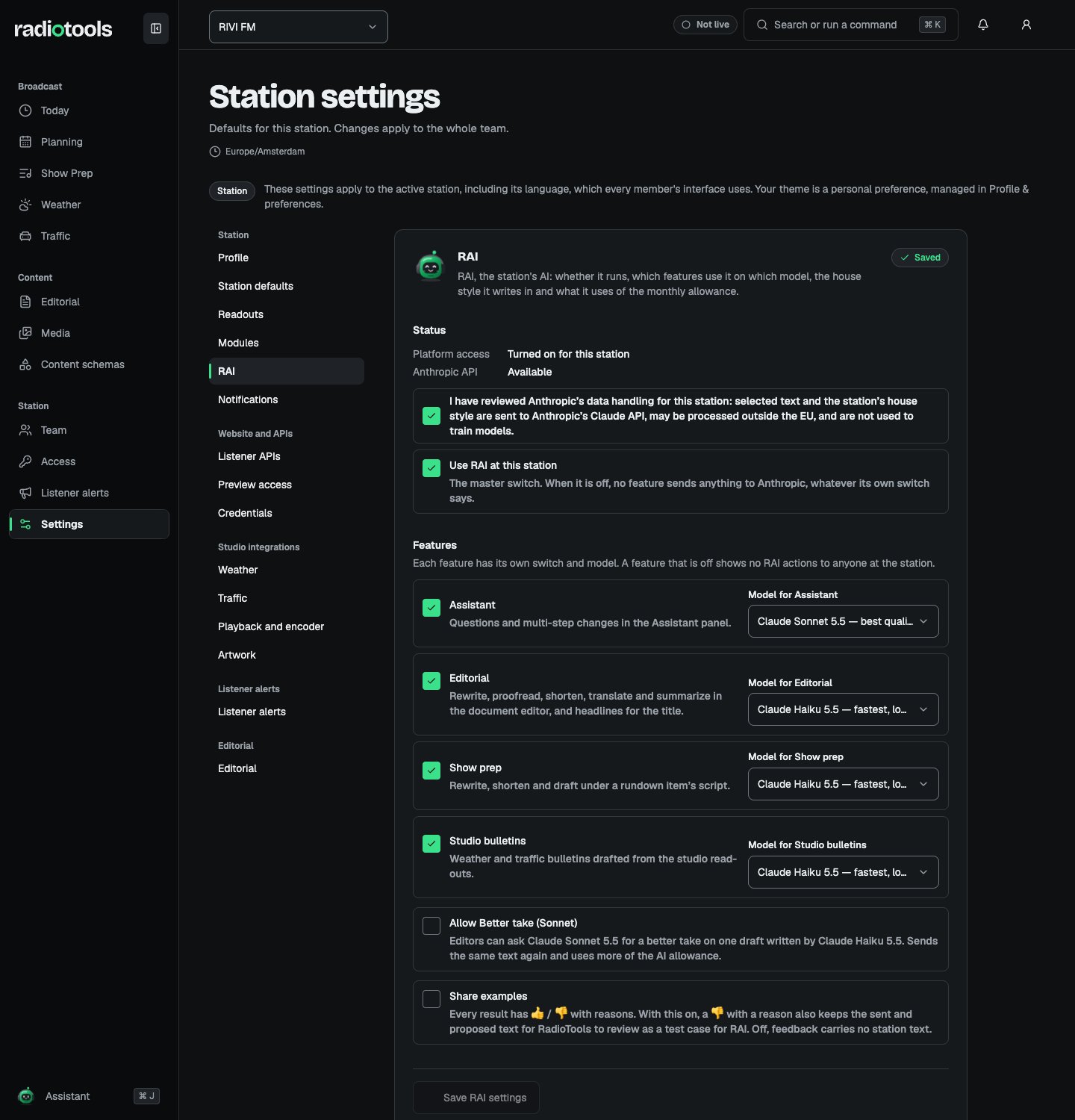
Open **Settings → RAI** with **Manage AI settings**. Under **Status**, **Platform access** shows whether RAI is turned on for the station. If it says **RAI is not turned on for this station**, ask RIVI to turn it on. A saved opt-in is restored when RAI is turned on again.
 ## What each feature sends
| Feature | What it does | Data sent when used |
| - | - | - |
| **Assistant** | Questions and multi-step changes in the Assistant panel | Your message, recent conversation context, and results of read actions you are allowed to use |
| **Editorial** | Rewrite, proofread, shorten, translate, and summarize in the document editor, and headlines for the title | The text the author selects, up to 8,000 characters |
| **Show prep** | Rewrite, shorten, and draft under a rundown item's script | The selected script text or notes of one rundown item |
| **Studio bulletins** | Weather and traffic bulletins drafted from the studio readouts | The weather or traffic data already on screen |
Editorial, show prep, and bulletin requests also send the station's house style when one is set. Only text you explicitly send leaves RadioTools. Anthropic does not use it for training, keeps it only if its safety systems flag a request, and may process it outside the EU. RadioTools keeps generated proposals for up to 30 days. Usage records hold counts only, never text.
Review the provider terms and station policy before turning RAI on. Users see a disclosure before sending assistant messages. Avoid placing secrets, or content that your station has not approved for external processing, in a request.
## Turn on RAI
1. Under **Status**, check that **Anthropic API** shows **Available**.
2. Tick the data-handling review: **I have reviewed Anthropic's data handling for this station**.
3. Tick **Use RAI at this station**. This is the master switch: when it is off, no feature sends anything, whatever its own switch says.
4. Under **Features**, switch each feature on or off and choose its model.
5. Choose **Save RAI settings**.
A feature that is off shows no RAI actions to anyone at the station. The rest of the station's workflow remains usable. To hide the Assistant entirely, you can also switch off the **Assistant** module in [Station settings](/radiotools/station-admin/station-settings#modules).
Under **Sample**, choose **Draft** to hear how a 30-second weather read sounds with the current settings, saved or not. Each sample is one RAI request on the studio bulletins model.
## Choose models
Each feature can use either model:
| Model | Best for |
| - | - |
| Claude Haiku 5.5 | Fastest, lowest cost |
| Claude Sonnet 5.5 | Best quality |
Turn on **Allow Better take (Sonnet)** to let editors ask Claude Sonnet 5.5 for a better take on one draft written by Claude Haiku 5.5. Each better take is a new request and uses more of the AI allowance.
Turn on **Share examples** to let RadioTools review the sent and proposed text when someone gives a result a thumbs-down with a reason. With it off, feedback carries no station text.
## Set a house style
Under **House style**, describe how RAI drafts should sound. Every editorial, show prep, and studio bulletin draft follows it.
| Setting | Use it for |
| - | - |
| **Tone** and **Tone notes** | A preset such as **Warm** or **Calm**, plus your own notes |
| **Dutch form of address** | **Formal (u)** or **Informal (je)** |
| **Station name as spoken on air** | How presenters say the station name |
| **Words and phrases to avoid** | One per line, up to 50 |
| **Reading times and numbers** | For example, say "half acht", not "19:30" |
| **Default language** | English, Dutch, or **As the request says** |
Choose **Save house style**. The house style guides wording only: it can't change what RAI may do. Proposals made under an older style can still be applied.
The language of on-air bulletins follows the station's **Readout language** in [Station settings](/radiotools/station-admin/station-settings#save-station-defaults).
## Usage and the monthly allowance
AI comes with the station's plan. Each seat adds credits to a shared pool for the station and gives its member a personal allowance. See [Billing](/radiotools/station-admin/billing). If the station has no plan that includes AI, RAI shows that instead of an allowance.
Under **Usage**, owners and admins see the plan, where the allowance comes from, the credits used this month, the shared pool and their own allowance, and a split by model. Other members only see whether AI is available. Sonnet costs about 20 times as much as Haiku for the same text.
A warning appears once 80% of the month's allowance is used. When the allowance is used up, RAI stops for the station until it resets on the first of the next month (UTC). Owners then see **Upgrade plan**, which opens a preview of a larger plan or an extra seat in Billing. Other members see **Ask a station owner to upgrade the plan.**
RAI also allows up to 50 requests per station per day, plus per-person limits on how fast you can send requests.
## Human review
Every RAI result is a proposal. Nothing changes until a person reviews it and applies it. Assistant proposals need approval and run with the approving user's permissions. Turning on RAI does not grant publishing or administration rights to the model.
Personal assistant messages and threads are excluded from owner exports.
## Turn off RAI
Clear **Use RAI at this station** and choose **Save RAI settings** to stop new requests. To stop one feature, switch off only that feature. Existing drafts and applied text remain.
See [Assistant](/radiotools/daily-work/assistant) for proposal expiry and recovery.
## Related topics
- [Station settings](/radiotools/station-admin/station-settings.md)
- [Billing](/radiotools/station-admin/billing.md)
- [Roles and access](/radiotools/station-admin/roles-and-access.md)
- [Integrations](/radiotools/station-admin/integrations.md)
- [Assistant](/radiotools/daily-work/assistant.md)
This documentation is built and hosted on [Mintlify](https://mintlify.com), a developer documentation platform.
## What each feature sends
| Feature | What it does | Data sent when used |
| - | - | - |
| **Assistant** | Questions and multi-step changes in the Assistant panel | Your message, recent conversation context, and results of read actions you are allowed to use |
| **Editorial** | Rewrite, proofread, shorten, translate, and summarize in the document editor, and headlines for the title | The text the author selects, up to 8,000 characters |
| **Show prep** | Rewrite, shorten, and draft under a rundown item's script | The selected script text or notes of one rundown item |
| **Studio bulletins** | Weather and traffic bulletins drafted from the studio readouts | The weather or traffic data already on screen |
Editorial, show prep, and bulletin requests also send the station's house style when one is set. Only text you explicitly send leaves RadioTools. Anthropic does not use it for training, keeps it only if its safety systems flag a request, and may process it outside the EU. RadioTools keeps generated proposals for up to 30 days. Usage records hold counts only, never text.
Review the provider terms and station policy before turning RAI on. Users see a disclosure before sending assistant messages. Avoid placing secrets, or content that your station has not approved for external processing, in a request.
## Turn on RAI
1. Under **Status**, check that **Anthropic API** shows **Available**.
2. Tick the data-handling review: **I have reviewed Anthropic's data handling for this station**.
3. Tick **Use RAI at this station**. This is the master switch: when it is off, no feature sends anything, whatever its own switch says.
4. Under **Features**, switch each feature on or off and choose its model.
5. Choose **Save RAI settings**.
A feature that is off shows no RAI actions to anyone at the station. The rest of the station's workflow remains usable. To hide the Assistant entirely, you can also switch off the **Assistant** module in [Station settings](/radiotools/station-admin/station-settings#modules).
Under **Sample**, choose **Draft** to hear how a 30-second weather read sounds with the current settings, saved or not. Each sample is one RAI request on the studio bulletins model.
## Choose models
Each feature can use either model:
| Model | Best for |
| - | - |
| Claude Haiku 5.5 | Fastest, lowest cost |
| Claude Sonnet 5.5 | Best quality |
Turn on **Allow Better take (Sonnet)** to let editors ask Claude Sonnet 5.5 for a better take on one draft written by Claude Haiku 5.5. Each better take is a new request and uses more of the AI allowance.
Turn on **Share examples** to let RadioTools review the sent and proposed text when someone gives a result a thumbs-down with a reason. With it off, feedback carries no station text.
## Set a house style
Under **House style**, describe how RAI drafts should sound. Every editorial, show prep, and studio bulletin draft follows it.
| Setting | Use it for |
| - | - |
| **Tone** and **Tone notes** | A preset such as **Warm** or **Calm**, plus your own notes |
| **Dutch form of address** | **Formal (u)** or **Informal (je)** |
| **Station name as spoken on air** | How presenters say the station name |
| **Words and phrases to avoid** | One per line, up to 50 |
| **Reading times and numbers** | For example, say "half acht", not "19:30" |
| **Default language** | English, Dutch, or **As the request says** |
Choose **Save house style**. The house style guides wording only: it can't change what RAI may do. Proposals made under an older style can still be applied.
The language of on-air bulletins follows the station's **Readout language** in [Station settings](/radiotools/station-admin/station-settings#save-station-defaults).
## Usage and the monthly allowance
AI comes with the station's plan. Each seat adds credits to a shared pool for the station and gives its member a personal allowance. See [Billing](/radiotools/station-admin/billing). If the station has no plan that includes AI, RAI shows that instead of an allowance.
Under **Usage**, owners and admins see the plan, where the allowance comes from, the credits used this month, the shared pool and their own allowance, and a split by model. Other members only see whether AI is available. Sonnet costs about 20 times as much as Haiku for the same text.
A warning appears once 80% of the month's allowance is used. When the allowance is used up, RAI stops for the station until it resets on the first of the next month (UTC). Owners then see **Upgrade plan**, which opens a preview of a larger plan or an extra seat in Billing. Other members see **Ask a station owner to upgrade the plan.**
RAI also allows up to 50 requests per station per day, plus per-person limits on how fast you can send requests.
## Human review
Every RAI result is a proposal. Nothing changes until a person reviews it and applies it. Assistant proposals need approval and run with the approving user's permissions. Turning on RAI does not grant publishing or administration rights to the model.
Personal assistant messages and threads are excluded from owner exports.
## Turn off RAI
Clear **Use RAI at this station** and choose **Save RAI settings** to stop new requests. To stop one feature, switch off only that feature. Existing drafts and applied text remain.
See [Assistant](/radiotools/daily-work/assistant) for proposal expiry and recovery.
## Related topics
- [Station settings](/radiotools/station-admin/station-settings.md)
- [Billing](/radiotools/station-admin/billing.md)
- [Roles and access](/radiotools/station-admin/roles-and-access.md)
- [Integrations](/radiotools/station-admin/integrations.md)
- [Assistant](/radiotools/daily-work/assistant.md)
This documentation is built and hosted on [Mintlify](https://mintlify.com), a developer documentation platform.