> ## Documentation Index
> Fetch the complete documentation index at: https://docs.rivi.software/llms.txt
> Use this file to discover all available pages before exploring further.
# Content types
> Configure stable fields for station content and listener delivery.
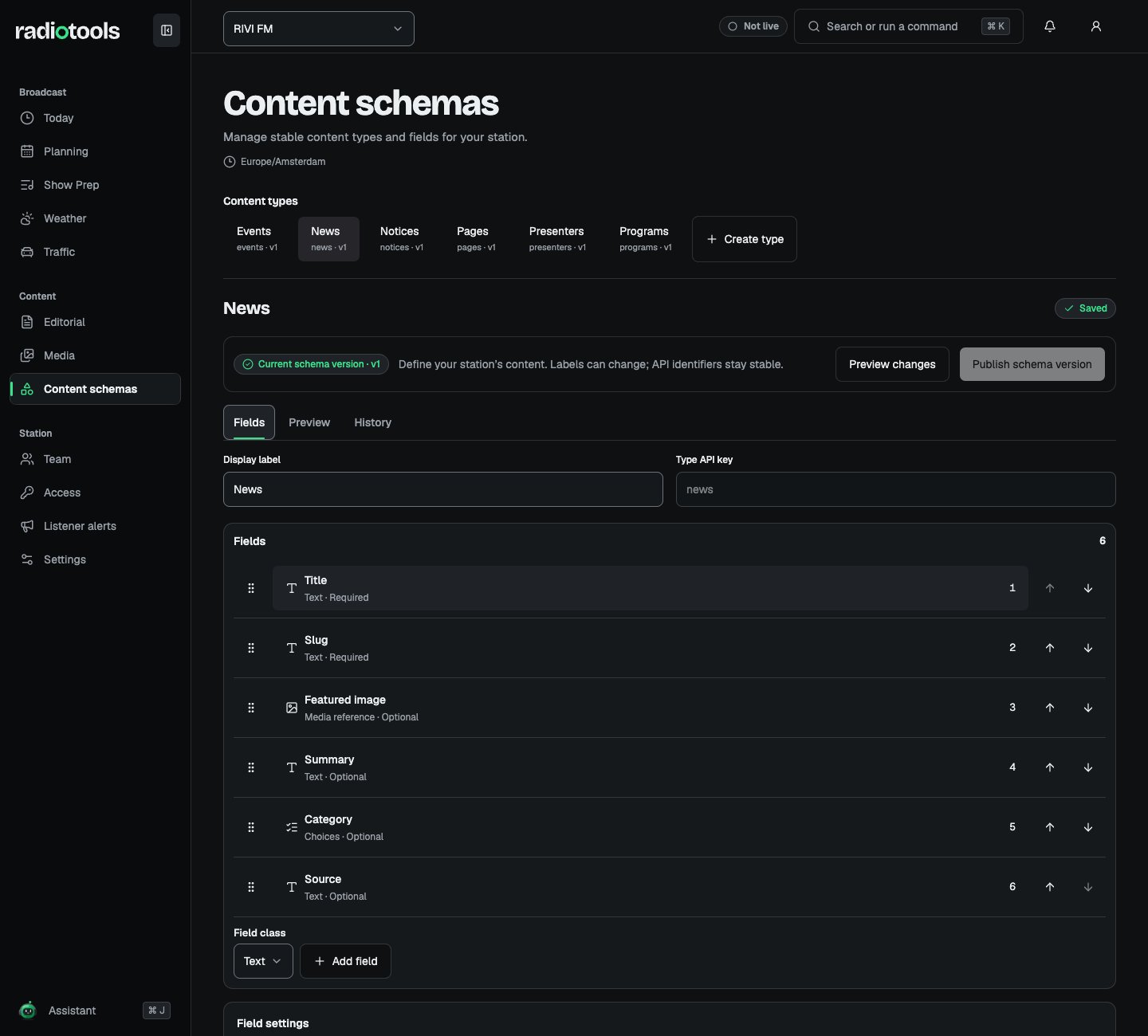
Open **Content schemas** with **Manage content schemas** to configure news, pages, programs, presenters, events, notices, and custom station types. Without that permission, you can inspect schemas but not change them. Editing and publishing a schema needs a desktop or tablet screen.
 ## Default fields
The standard types come with optional fields for radio content:
| Type | Default fields |
| - | - |
| News | Summary, category, source |
| Programs | Description, presenters, website |
| Presenters | Bio, role |
| Events | Venue, address, URL, summary |
| Notices | Summary, level |
Pages have no extra default fields. You can relabel, reorder, or archive these fields like your own.
Published program and presenter records link back to the programs in Planning. Public program data also includes the program's presenters and regular time slots from the schedule.
## Plan the type before editing
Decide what authors must enter, what listeners should receive, and which related records or media are needed. For a fictional RIVI FM event type, you might need a title, start date, venue, and artwork.
Use stable API keys for types and fields. Keys identify the data used by integrations; display labels are the names authors see. Avoid changing a key just to improve its display wording.
## Configure fields
Choose **Add field** and pick a **Field class**: **Text**, **Rich text**, **Number**, **Boolean**, **Date/time (station clock)**, **Choices**, **Media reference**, **Content reference**, or **Repeated group**. Configure required values and constraints according to the field class. A schema can contain up to 64 fields, including group children.
For a **Choices** field, turn on **Allow several choices** to let writers tick any number of options, such as tags, categories, or regions. Set **Maximum choices** to limit them.
**Public definition** determines which fields appear in published listener data. Keep internal notes and staff-only information out of public fields. **Reference visibility** can require a related record to be published, or allow any target the caller can read for a private field.
## Review and publish a schema version
Your edits stay local, marked as **Unpublished changes**, until you publish them.
1. Choose **Preview changes** to see the **Change impact**: a **Compatible change**, or a **Breaking change** that needs validation or migration.
2. Check the effect on existing drafts and saved views. On the **Migration** tab, use **Prepare draft migration** to correct affected drafts.
3. Choose **Publish schema version** and confirm.
Publishing a schema applies it to new records and any prepared draft migration. It does not publish content records. Published records keep their original schema version, so changing the schema does not silently rewrite an already-published snapshot. The **History** tab lists earlier changes.
Switching off the **Content schemas** module hides the editor and stops schema changes. Stories keep their types.
## Authoring and review
The station workflow, rich body authoring mode, and review requirement are configured in [Editorial policies](/radiotools/station-admin/editorial-policies). Decide whether the type needs a continuous document or ordered blocks, then explain the workflow to authors.
## Custom rundown types
Custom preparation item types are separate from editorial content schemas. In **Show Prep**, staff with **Manage planning** open **Item types** to add up to eight fields to a built-in type or define a custom type, such as `custom:sponsor`. A custom type can need a script or media and has a default length. Built-in music, speech, news, and other types stay available.
A station can have up to 20 custom types, so review unused types before adding more. Required fields count towards an item's readiness.
## Related topics
- [List content](/radiotools/api-reference/public-listener/list-content.md)
- [Get content record](/radiotools/api-reference/public-listener/get-content-record.md)
- [List content schemas](/radiotools/api-reference/public-listener/list-content-schemas.md)
- [Get content record by slug](/radiotools/api-reference/public-listener/get-content-record-by-slug.md)
- [TypeScript SDK](/radiotools/api-reference/sdks/typescript.md)
This documentation is built and hosted on [Mintlify](https://mintlify.com), a developer documentation platform.
## Default fields
The standard types come with optional fields for radio content:
| Type | Default fields |
| - | - |
| News | Summary, category, source |
| Programs | Description, presenters, website |
| Presenters | Bio, role |
| Events | Venue, address, URL, summary |
| Notices | Summary, level |
Pages have no extra default fields. You can relabel, reorder, or archive these fields like your own.
Published program and presenter records link back to the programs in Planning. Public program data also includes the program's presenters and regular time slots from the schedule.
## Plan the type before editing
Decide what authors must enter, what listeners should receive, and which related records or media are needed. For a fictional RIVI FM event type, you might need a title, start date, venue, and artwork.
Use stable API keys for types and fields. Keys identify the data used by integrations; display labels are the names authors see. Avoid changing a key just to improve its display wording.
## Configure fields
Choose **Add field** and pick a **Field class**: **Text**, **Rich text**, **Number**, **Boolean**, **Date/time (station clock)**, **Choices**, **Media reference**, **Content reference**, or **Repeated group**. Configure required values and constraints according to the field class. A schema can contain up to 64 fields, including group children.
For a **Choices** field, turn on **Allow several choices** to let writers tick any number of options, such as tags, categories, or regions. Set **Maximum choices** to limit them.
**Public definition** determines which fields appear in published listener data. Keep internal notes and staff-only information out of public fields. **Reference visibility** can require a related record to be published, or allow any target the caller can read for a private field.
## Review and publish a schema version
Your edits stay local, marked as **Unpublished changes**, until you publish them.
1. Choose **Preview changes** to see the **Change impact**: a **Compatible change**, or a **Breaking change** that needs validation or migration.
2. Check the effect on existing drafts and saved views. On the **Migration** tab, use **Prepare draft migration** to correct affected drafts.
3. Choose **Publish schema version** and confirm.
Publishing a schema applies it to new records and any prepared draft migration. It does not publish content records. Published records keep their original schema version, so changing the schema does not silently rewrite an already-published snapshot. The **History** tab lists earlier changes.
Switching off the **Content schemas** module hides the editor and stops schema changes. Stories keep their types.
## Authoring and review
The station workflow, rich body authoring mode, and review requirement are configured in [Editorial policies](/radiotools/station-admin/editorial-policies). Decide whether the type needs a continuous document or ordered blocks, then explain the workflow to authors.
## Custom rundown types
Custom preparation item types are separate from editorial content schemas. In **Show Prep**, staff with **Manage planning** open **Item types** to add up to eight fields to a built-in type or define a custom type, such as `custom:sponsor`. A custom type can need a script or media and has a default length. Built-in music, speech, news, and other types stay available.
A station can have up to 20 custom types, so review unused types before adding more. Required fields count towards an item's readiness.
## Related topics
- [List content](/radiotools/api-reference/public-listener/list-content.md)
- [Get content record](/radiotools/api-reference/public-listener/get-content-record.md)
- [List content schemas](/radiotools/api-reference/public-listener/list-content-schemas.md)
- [Get content record by slug](/radiotools/api-reference/public-listener/get-content-record-by-slug.md)
- [TypeScript SDK](/radiotools/api-reference/sdks/typescript.md)
This documentation is built and hosted on [Mintlify](https://mintlify.com), a developer documentation platform.